Every business owner wants more traffic and more customers. But as we all know, simply having a website isn’t enough. You need to make sure your potential customers can find you when they search on Google.
The good news? Google gives you all the insights you need—for free!
Most businesses focus only on Google Ads or SEO, but there’s an incredibly powerful, often overlooked way to drive traffic to your website: Answering the exact questions your customers are asking on Google.
In this blog, I’ll walk you through a simple yet highly effective Google research strategy that will help you:
- Drive a tonne of traffic to your website
- Attract high-intent customers
- Position yourself as an industry expert
- Boost your rankings on Google
Follow this strategy step by step, and you’ll start seeing more leads and sales for your business.
Step 1: Search for Your Service on Google
To start, go to Google.com and type in the name of your service.
For example, if you run a plumbing business, search for:
- “Emergency plumber”
- “Best plumbing services in London”
- “Blocked drain repair”
Google will instantly show you results related to your service. But instead of clicking on the ads or organic listings, scroll down to the ‘People Also Ask’ section.
Step 2: Use the ‘People Also Ask’ Section
The ‘People Also Ask’ (PAA) section is a goldmine for content ideas. This is where Google shows the most common questions people are asking about your product or service.
For example, if you searched for “best plumbing services”, you might see questions like:
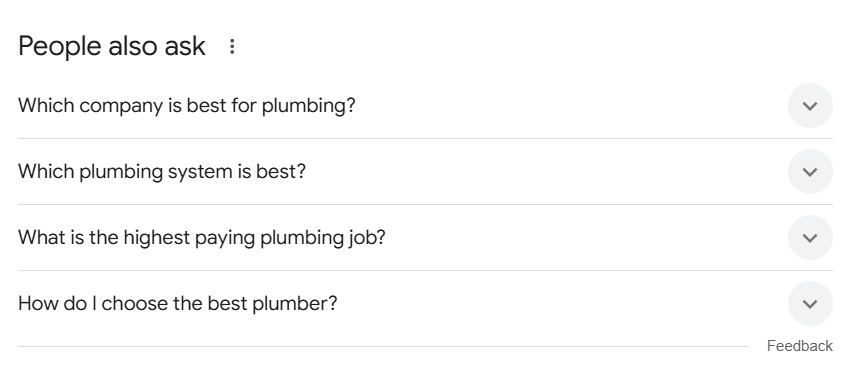 people also ask
- “How do I find a reliable plumber?”
- “What are the signs of a plumbing issue?”
- “How much -should I expect to pay for a plumber?”
If you searched for “best landscapers near me”, you might see questions like:
- “What is the best time of year to landscape a garden?”
- “How much does it cost to redesign a garden?”
- “Do landscapers offer maintenance services?”
For a loft conversion company, you might find:
- “How much value does a loft conversion add to a house?”
- “Do you need planning permission for a loft conversion?”
- “How long does a loft conversion take?”
These are real questions that potential customers are asking right now. Your goal is to answer these questions with valuable content.
How to Expand the ‘People Also Ask’ Section
When you click on any question in the PAA section, Google will load even more related questions.
Keep clicking on different questions, and you’ll generate a huge list of customer queries that you can use to create blog posts, videos, and other content.
Must cheque: Blog post topic ideas for landscapers
Step 3: Follow the Page Links and Analyse the Content
Once you’ve identified some interesting questions, click on the links to see which websites are currently ranking for those queries.
Take note of:
The type of content they provide – Is it a blog post, a FAQ page, or a detailed guide?
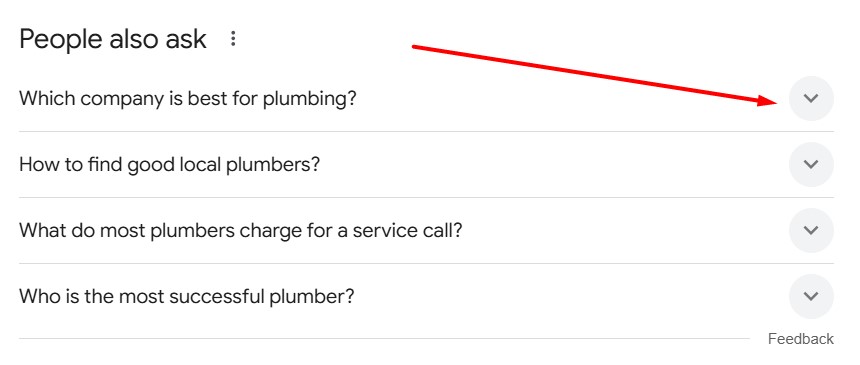 people also ask - click on links
The structure of their content – Do they use bullet points, numbered lists, or in-depth explanations? How well they answer the question – Are they providing valuable insights, or just basic information?
Your goal is to create something better than what’s already ranking.
If a competitor’s page gives short, vague answers, you can:
- Write a longer, more detailed blog post
- Include images, videos, and infographics
- Provide real-world examples and case studies
Google prioritises useful and engaging content, so if your page offers more value than existing results, you have a good chance of ranking higher.
Step 4: Create Blog Posts and Video Content
Now that you have a list of questions and competitor research, it’s time to create high-quality content that answers these queries.
Must cheque: Blog post topics for driveway companies
A. Writing Blog Posts That Rank on Google
When writing a blog post, follow this structure:
- Catchy Headline – Make it clear and engaging. Example:“How to Find a Reliable Plumber: 5 Signs to Look For”“The Complete Guide to Loft Conversions: Costs, Planning, and Benefits”
- Introduction – Address the problem and explain what the blog will cover.
- Answer the Question Directly – Start with a clear, concise answer, then go into more detail.
- Provide Additional Insights – Add relevant information, examples, and case studies.
- Optimise for SEO – Use keywords, internal links, and bullet points to improve readability.
- End with a Call to Action (CTA) – Encourage readers to contact you, download a resource, or follow your social media.
B. Creating Video Content
If you want to reach even more people, turn your blog content into a video.
Here’s why:
 Grace
Grace- YouTube is the second largest search engine in the world – More people watch videos than read blogs.
- Short videos perform well on social media – Platforms like Instagram, TikTok, and Facebook prioritise video content.
- Videos boost website engagement – Adding videos to your website increases time spent on page, which helps SEO.
How to Create a Simple Video for Your Business
- Script your video – Use your blog post as a rough outline.
- Keep it short and engaging – Two to five minutes is ideal.
- Answer the question clearly – Just like in your blog.
- Use visuals – Show examples, demonstrations, or on-screen text.
- Add a CTA at the end – Encourage viewers to visit your website or contact you.
Post your video on YouTube, embed it in your blog, and share it on social media.
Step 5: Get More Traffic and Customers
By consistently creating content that answers real customer questions, you’ll:
- Rank higher on Google – Bringing in more organic traffic.
- Attract potential customers – People searching for answers are more likely to buy.
- Establish authority in your industry – Positioning yourself as an expert.
- Boost engagement on social media – Videos and blog posts perform well.
But don’t stop at just one blog or video. Keep researching new People Also Ask questions every week and create ongoing content to grow your traffic and leads.
Conclusion
Google is already telling you exactly what your customers want to know. Instead of guessing what content to create, use the ‘People Also Ask’ section to find highly relevant questions and answer them better than anyone else.
By following this strategy, you’ll drive more targeted traffic, increase customer trust, and grow your business faster—without spending a fortune on ads.
Speak with our Marketing Specialist
Got a quick question about growing your local business? We can help.
Speak to one of our experts today on 01702 668207 or send us a message.